
Nginx
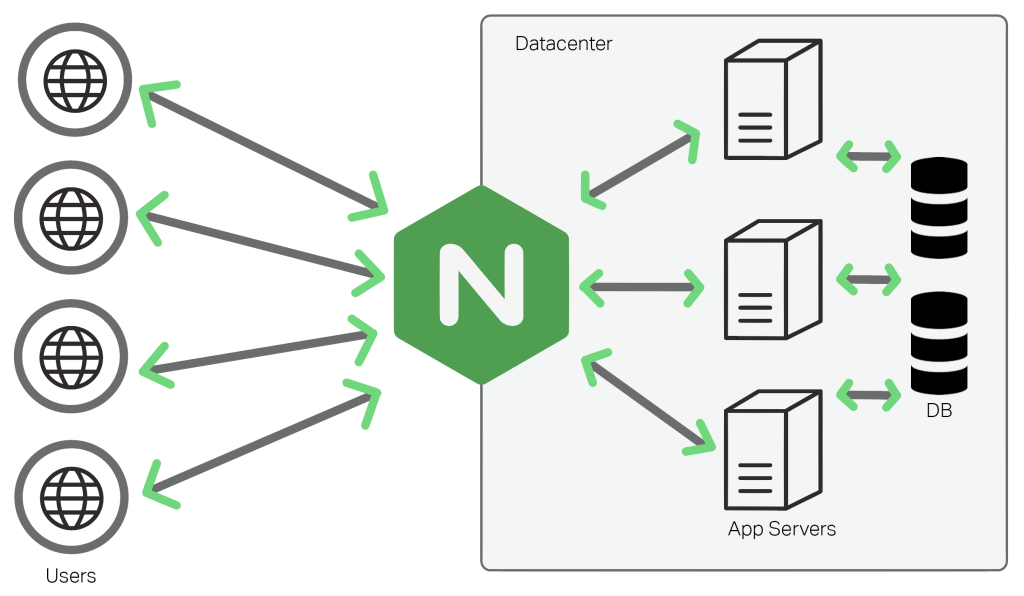
NGINX 中有四个核心上下文:
events { }– events 上下文用于设置关于 NGINX 如何在一般级别处理请求的全局配置。一个有效的配置文件中只能有一个 events 上下文。http { }– 顾名思义,http 上下文用于定义有关服务器将如何处理 HTTP 和 HTTPS 请求的配置。一个有效的配置文件中只能有一个 http 上下文。server { }– server 上下文嵌套在 http 上下文中,用于在单个主机内配置特定的虚拟服务器。在嵌套在 http 上下文中的有效配置文件中可以有多个 server 上下文。每个“服务器”上下文都被认为是一个虚拟主机。main– main 上下文是配置文件本身。在前面提到的三个上下文之外编写的任何内容都在 main 上下文中。
nginx.conf 结构图可以这样概括:
main # 全局配置,对全局生效
├── events # 配置影响 Nginx 服务器或与用户的网络连接
├── http # 配置代理,缓存,日志定义等绝大多数功能和第三方模块的配置
│ ├── upstream # 配置后端服务器具体地址,负载均衡配置不可或缺的部分
│ ├── server # 配置虚拟主机的相关参数,一个 http 块中可以有多个 server 块
│ ├── server
│ │ ├── location # server 块可以包含多个 location 块,location 指令用于匹配 uri
│ │ ├── location
│ │ └── ...
│ └── ...
└── ...
nginx 的配置文件
version: '3'
services:
  nginx:
    image: nginx:alpine
    restart: always
    container_name: nginx
    ports:
      - '80:80'
      - '443:443'
    volumes:
      - /docker/nginx/conf/nginx.conf:/etc/nginx/nginx.conf
      - /docker/nginx/cert:/etc/nginx/cert
      - /docker/continew-admin/web:/usr/share/nginx/html
      - /docker/nginx/logs:/var/log/nginx
我们通过 nginx:alpine 镜像来了解 nginx 的配置文件都有哪些。
$ docker run -it --rm nginx:alpine sh

$ ls -lah /etc/nginx/
total 40K
drwxr-xr-x    3 root     root        4.0K Nov 13  2021 .
drwxr-xr-x    1 root     root        4.0K Jun 14 07:55 ..
drwxr-xr-x    2 root     root        4.0K Nov 13  2021 conf.d
-rw-r--r--    1 root     root        1.1K Nov  2  2021 fastcgi.conf
-rw-r--r--    1 root     root        1007 Nov  2  2021 fastcgi_params
-rw-r--r--    1 root     root        5.2K Nov  2  2021 mime.types
lrwxrwxrwx    1 root     root          22 Nov 13  2021 modules -> /usr/lib/nginx/modules
-rw-r--r--    1 root     root         648 Nov  2  2021 nginx.conf
-rw-r--r--    1 root     root         636 Nov  2  2021 scgi_params
-rw-r--r--    1 root     root         664 Nov  2  2021 uwsgi_params
在 nginx 中,其中比较重要的有以下几个文件,而它们都是有层层关联的:
nginx 主配置文件/etc/nginx/nginx.conf,引用了 /etc/nginx/conf.d/ 目录下的所有配置文件。
user  nginx;
worker_processes  auto;

error_log  /var/log/nginx/error.log notice;
pid        /var/run/nginx.pid;

events {
    worker_connections  1024;
}

http {
    include       /etc/nginx/mime.types;
    default_type  application/octet-stream;

    log_format  main  '$remote_addr - $remote_user [$time_local] "$request" '
                      '$status $body_bytes_sent "$http_referer" '
                      '"$http_user_agent" "$http_x_forwarded_for"';

    access_log  /var/log/nginx/access.log  main;

    sendfile        on;
    #tcp_nopush     on;

    keepalive_timeout  65;

    #gzip  on;

    include /etc/nginx/conf.d/*.conf;
}server {
listen 80;
server_name localhost;
#access_log /var/log/nginx/host.access.log main;
location / {
root /usr/share/nginx/html;
index index.html index.htm;
}
#error_page 404 /404.html;
# redirect server error pages to the static page /50x.html
#
error_page 500 502 503 504 /50x.html;
location = /50x.html {
root /usr/share/nginx/html;
}
# proxy the PHP scripts to Apache listening on 127.0.0.1:80
#
#location ~ \.php$ {
# proxy_pass http://127.0.0.1;
#}
# pass the PHP scripts to FastCGI server listening on 127.0.0.1:9000
#
#location ~ \.php$ {
# root html;
# fastcgi_pass 127.0.0.1:9000;
# fastcgi_index index.php;
# fastcgi_param SCRIPT_FILENAME /scripts$fastcgi_script_name;
# include fastcgi_params;
#}
# deny access to .htaccess files, if Apache's document root
# concurs with nginx's one
#
#location ~ /\.ht {
# deny all;
#}
}默认的静态资源目录 /usr/share/nginx/html,其目录下的 index.html 也是 nginx 的欢迎页面。
location路由匹配规则
location 用以匹配路由,配置语法如下。
location [ = | ~ | ~* | ^~ ] uri { ... }其中 uri 前可提供以下修饰符
=精确匹配,优先级最高。^~前缀匹配,优先级其次。如果同样是前缀匹配,走最长路径。~正则匹配,优先级再次 (~* 只是不区分大小写,不单列)。如果同样是正则匹配,走第一个路径。/通用匹配,优先级再次。=: 精确匹配路径,用于不含正则表达式的 uri 前,如果匹配成功,不再进行后续的查找;^~: 用于不含正则表达式的 uri; 前,表示如果该符号后面的字符是最佳匹配,采用该规则,不再进行后续的查找;
优先级
- 完全匹配
路径,用于不含正则表达式的 uri 前,如果匹配成功,不再进行后续的查找;
server {
  location = /download {
    alias	/usr/share/nginx/html/static;  # 静态资源目录
  }
}- 前缀匹配
要将前缀匹配转换为优先匹配,需要在位置 URI 之前包含 ^~ 修饰符
用于不含正则表达式的 uri; 前,表示如果该符号后面的字符是最佳匹配,采用该规则,不再进行后续的查找;
server {
  location ^~ /download {
    alias	/usr/share/nginx/html/static;  # 静态资源目录
  }
}- 正则匹配
~: 表示用该符号后面的正则去匹配路径,区分大小写;~*: 表示用该符号后面的正则去匹配路径,不区分大小写。跟 ~ 优先级都比较低,如有多个 location 的正则能匹配的话,则使用正则表达式最长的那个;
- 通用匹配
server {
   location / {
     root   /usr/share/nginx/html;
     index  index.html index.htm;
   }
}
rewrite
rewrite 访问重写是通过 rewrite 指令实现的,rewrite 指令的语法格式如下:
rewrite regex replacement [flag];regex 是 PCRE 语法格式的正则表达式。
replacement 是重写 URI 的改写规则。当改写规则以"http://""https://"或"$scheme"开头时,Nginx 重写该语句后将停止执行后续任务,并将改写后的 URI 跳转返回客户端。
flag 是执行该条重写指令后的操作控制符。操作控制符有如下 4 种:
last:执行完当前重写规则跳转到新的 URI 后继续执行后续操作;break:执行完当前重写规则跳转到新的 URI 后不再执行后续操作。不影响用户浏览器 URI 显示;redirect:返回响应状态码 302 的临时重定向,返回内容是重定向 URI 的内容,但浏览器网址仍为请求时的 URI;permanent:返回响应状态码 301 的永久重定向,返回内容是重定向 URI 的内容,浏览器网址变为重定向的 URI。
将 http://localhost/notebook-js/assets/css/0.styles.422b1f7a.css 重定向到 http://localhost/assets/css/0.styles.422b1f7a.css
server{
 rewrite ^/notebook-js\/(.*) /$1 permanent;
}
缓存
server {
  location / {
    # 不缓存html,防止程序更新后缓存继续生效
    if ($request_filename ~* .*\.(?:htm|html)$) {
      add_header Cache-Control "private, no-store, no-cache, must-revalidate, proxy-revalidate";
      access_log on;
    }
    index index.html index.htm;
    try_files $uri $uri/ /index.html;
  }
}
跨域
当使用 proxy_pass 代理路径时,有两种情况
代理服务器地址不含 URI,则此时客户端请求路径与代理服务器路径相同。强烈建议这种方式 代理服务器地址含 URI,则此时客户端请求路径匹配 location,并将其 location 后的路径附在代理服务器地址后
server {
    listen       80;
    server_name  localhost;

    location / {
        root   /usr/share/nginx/html;
        index  index.html index.htm;
    }

    location /api {
        proxy_pass http://domain;
    }
}
负载均衡
轮询
# 设定http服务器,利用它的反向代理功能提供负载均衡支持
http {
  #设定负载均衡的服务器列表
  upstream server {
    server 192.168.8.1:80;
    server 192.168.8.2:80;
    server 192.168.8.3:80;
  }

  server {
    location / {
    	proxy_pass http://server;
      proxy_connect_timeout 10;
    }
  }
}
权重
weight指令用于指定轮询机率,weight的默认值为1,weight的数值与访问比率成正比。 接下来我们指定8082端口的服务的weight=2,如下:
# 设定http服务器,利用它的反向代理功能提供负载均衡支持
http {
  #设定负载均衡的服务器列表
  upstream server {
    #weigth参数表示权值,权值越高被分配到的几率越大
    server 192.168.8.1:80  weight=5;
    server 192.168.8.2:80  weight=1;
    server 192.168.8.3:80  weight=6;
  }

  server {
    location / {
    	proxy_pass http://server;
      proxy_connect_timeout 10;
    }
  }
}
ip_hash
设定ip哈希很简单,就是在你的upstream中 指定 ip_hash;即可,如下:
http {
  #设定负载均衡的服务器列表
  upstream server {
    ip_hash
    server 192.168.8.1:80;
    server 192.168.8.2:80;
    server 192.168.8.3:80;
  }

  server {
    location / {
    	proxy_pass http://server;
      proxy_connect_timeout 10;
    }
  }
}server {
location / {
root /usr/share/nginx/html/;
try_files $uri $uri/ @router;
index index.html index.htm;
}
location /next {
alias /usr/share/nginx/html/rm-front-pro/;
try_files $uri $uri/ @next;
index index.html index.htm;
}
location @router {
rewrite ^.*$ /index.html last;
}
location @next {
rewrite ^.*$ /rm-front-pro/index.html last;
}
}限流
http{
    # 对请求速率限流
    limit_req_zone $binary_remote_addr zone=myRateLimit:10m rate=5r/s;

    server{
        location /api{
            limit_req zone=myRateLimit burst=5  nodelay;
            limit_req_status 520;
            limit_req_log_level info;
        }
    }
}
黑/白名单
server {
  #禁止访问 .htxxx 文件
  location ~ /\.ht {
    deny all;
  }
}
静态资源服务
表示用该符号后面的正则去匹配路径,区分大小写;
server {
  location ~ /download {
    alias	/usr/share/nginx/html/static;  # 静态资源目录
  }

  location ~* \.(gif|jpg|jpeg|png|css|js|ico)$ {
    root /usr/share/nginx/html/static;
  }

  #静态文件,nginx自己处理
  location ~ ^/(images|javascript|js|css|flash|media|static)/ {
    root /var/www/virtual/htdocs;
    #过期30天,静态文件不怎么更新,过期可以设大一点,如果频繁更新,则可以设置得小一点。
    expires 30d;
  }
}
默认情况下,正则表达式匹配 区分大小写,这意味着如果将任何字母大写,则该 location 将不起作用 要将其转换为不区分大小写,必须在 ~ 符号后添加一个 *。 表示用该符号后面的正则去匹配路径,不区分大小写。跟 ~ 优先级都比较低,如有多个 location 的正则能匹配的话,则使用正则表达式最长的那个;
server {
  location ~* /download {
    alias	/usr/share/nginx/html/static;  # 静态资源目录
  }
}server {
listen 80;
server_name static.sherlocked93.club;
charset utf-8; # 防止中文文件名乱码
location /download {
alias /usr/share/nginx/html/static; # 静态资源目录
autoindex on; # 开启静态资源列目录
autoindex_exact_size off; # on(默认)显示文件的确切大小,单位是byte;off显示文件大概大小,单位KB、MB、GB
autoindex_localtime off; # off(默认)时显示的文件时间为GMT时间;on显示的文件时间为服务器时间
}
}防盗链
日志
/var/log/nginx
基础设置说明
# 运行用户
user www-data;
# 启动进程,通常设置成和cpu的数量相等
worker_processes  1;

#全局错误日志及PID文件
error_log  /var/log/nginx/error.log;
pid        /var/run/nginx.pid;

#工作模式及连接数上限
events {
    # epoll是多路复用IO(I/O Multiplexing)中的一种方式
    # 但是仅用于linux2.6以上内核,可以大大提高nginx的性能
    use   epoll;
    #单个后台worker process进程的最大并发链接数
    worker_connections  1024;
    # multi_accept on;
}

#设定http服务器,利用它的反向代理功能提供负载均衡支持
http {
     #设定mime类型,类型由mime.type文件定义
    include       /etc/nginx/mime.types;
    default_type  application/octet-stream;
    #设定日志格式
    access_log    /var/log/nginx/access.log;

    # sendfile 指令指定 nginx 是否调用 sendfile 函数(zero copy 方式)来输出文件
    # 对于普通应用,必须设为 on,如果用来进行下载等应用磁盘IO重负载应用
    # 可设置为 off,以平衡磁盘与网络I/O处理速度,降低系统的uptime.
    sendfile        on;
    #tcp_nopush     on;

    #连接超时时间
    #keepalive_timeout  0;
    keepalive_timeout  65;
    tcp_nodelay        on;

    #开启gzip压缩
    gzip  on;
    gzip_disable "MSIE [1-6]\.(?!.*SV1)";

    #设定请求缓冲
    client_header_buffer_size    1k;
    large_client_header_buffers  4 4k;

    include /etc/nginx/conf.d/*.conf;
    include /etc/nginx/sites-enabled/*;

    #设定负载均衡的服务器列表
    upstream mysvr {
      #weigth参数表示权值,权值越高被分配到的几率越大
      #本机上的Squid开启3128端口
      server 192.168.8.1:3128 weight=5;
      server 192.168.8.2:80  weight=1;
      server 192.168.8.3:80  weight=6;
    }

    server {
      #侦听80端口
      listen       80;
      #定义使用www.xx.com访问
      server_name  www.xx.com;

      #设定本虚拟主机的访问日志
      access_log  logs/www.xx.com.access.log  main;

      #默认请求
      location / {
        root   /root;      #定义服务器的默认网站根目录位置
        index index.php index.html index.htm;   #定义首页索引文件的名称

        fastcgi_pass  www.xx.com;
        fastcgi_param  SCRIPT_FILENAME  $document_root/$fastcgi_script_name;
        include /etc/nginx/fastcgi_params;
      }

      # 定义错误提示页面
      error_page   500 502 503 504 /50x.html;
          location = /50x.html {
          root   /root;
      }

      #静态文件,nginx自己处理
      location ~ ^/(images|javascript|js|css|flash|media|static)/ {
          root /var/www/virtual/htdocs;
          #过期30天,静态文件不怎么更新,过期可以设大一点,如果频繁更新,则可以设置得小一点。
          expires 30d;
      }
      #PHP 脚本请求全部转发到 FastCGI处理. 使用FastCGI默认配置.
      location ~ \.php$ {
          root /root;
          fastcgi_pass 127.0.0.1:9000;
          fastcgi_index index.php;
          fastcgi_param SCRIPT_FILENAME /home/www/www$fastcgi_script_name;
          include fastcgi_params;
      }
      #设定查看Nginx状态的地址
      location /NginxStatus {
          stub_status            on;
          access_log              on;
          auth_basic              "NginxStatus";
          auth_basic_user_file  conf/htpasswd;
      }
      #禁止访问 .htxxx 文件
      location ~ /\.ht {
          deny all;
      }
    }
}
Reference