
元素大小和滚动
元素大小
元素有边框(border),内边距(padding)和滚动(scrolling)等全套功能。但没有外边距(margin),因为它们不是元素本身的一部分,并且它们没什么特殊的属性。
getBoundingClientRect
Element.getBoundingClientRect() 方法返回元素的大小及其相对于视口的位置。
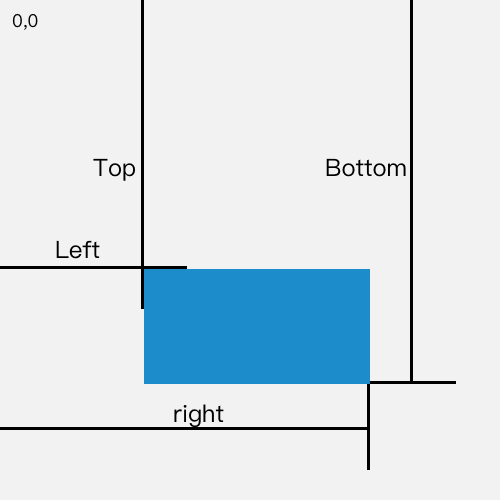
如果是标准盒子模型即 box-sizing: content-box,元素的尺寸等于 width/height + padding + border-width 的总和。
如果 box-sizing: border-box,元素的的尺寸等于 width/height。
clientLeft 和 clientTop
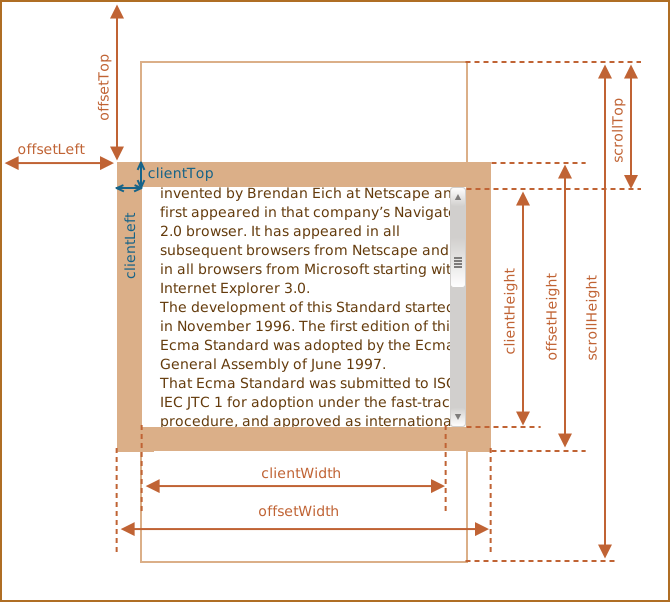
表示一个元素的左边框的宽度,以像素表示。如果元素的文本方向是从右向左(RTL, right-to-left),并且由于内容溢出导致左边出现了一个垂直滚动条,则该属性包括滚动条的宽度。clientLeft 不包括左外边距和左内边距。clientLeft 是只读的。
const body = document.body

// 即 CSS 中 border-left 的值
const borderLeft = body.clientLeft // -> 20HTMLElement.clientTop一个元素顶部边框的宽度(以像素表示)。不包括顶部外边距或内边距。clientTop 是只读的。
const body = document.body

// 即 CSS 中 border-top 的值
const borderLeft = body.clientTop // -> 20表示一个元素的左边框的宽度,以像素表示。clientLeft = 左边框宽度 + 滚动条宽度,不包括左外边距和左内边距。
如果元素的文本方向是从右向左(RTL, right-to-left),并且由于内容溢出导致左边出现了一个垂直滚动条,则该属性包括滚动条的宽度。
clientWidth 和 clientHeight
表示元素的内部宽度,以像素表示。该属性包括内边距 padding,但不包括边框 border、外边距 margin 和垂直滚动条。clientWidth = content + padding。
内联元素以及没有 CSS 样式的元素的 clientWidth 属性值为 0。
当在根元素(<html>元素)上使用 clientWidth 时(或者在<body>上,如果文档是在 quirks(怪异)模式下),将返回 viewport 的宽度(不包括任何滚动条)
offsetParent,offsetLeft/Top
offsetParent
对块级元素来说,offsetTop、offsetLeft、offsetWidth 及 offsetHeight 描述了元素相对于 offsetParent 的边界框。
offsetParent 是最接近的祖先(ancestor),在浏览器渲染期间,它被用于计算坐标。
- CSS 定位的(position 为 absolute,relative 或 fixed)
- 或
<td>,<th>,<table>,但必须要position: static。 - 或
<body>。
有以下几种情况下,offsetParent 的值为 null:
- 对于未显示的元素(display:none 或者不在文档中)。
- 对于
<body>与<html>。 - 对于带有 position:fixed 的元素。
offsetLeft 和 offsetTop
offsetLeft/offsetTop 提供相对于 offsetParent (padding-box) 左上角的 x/y 坐标。
HTMLElement.offsetTop为只读属性,它返回当前元素相对于其 offsetParent 元素的顶部的距离。HTMLElement.offsetLeft为只读属性,返回当前元素左上角相对于 offsetParent 节点的左边界偏移的像素值。
对块级元素来说,offsetTop、offsetLeft、offsetWidth 及 offsetHeight 描述了元素相对于 offsetParent 的边界框。
然而,对于可被截断到下一行的行内元素(如 span),offsetTop 和 offsetLeft 描述的是第一个边界框的位置(使用 Element.getClientRects() 来获取其宽度和高度),而 offsetWidth 和 offsetHeight 描述的是边界框的尺寸(使用 Element.getBoundingClientRect 来获取其位置)。因此,使用 offsetLeft、offsetTop、offsetWidth、offsetHeight 来对应 left、top、width 和 height 的一个盒子将不会是文本容器 span 的盒子边界。
offsetWidth 和 offsetHeight
测量包含元素的边框(border)、水平线上的内边距(padding)、竖直方向滚动条(scrollbar)(如果存在的话)、以及 CSS 设置的宽度(width)的值。(即 content + scrollbar + padding + border)
HTMLElement.offsetHeight 是一个只读属性,它返回该元素的像素高度,高度包含该元素的垂直内边距和边框,且是一个整数。
通常,元素的 offsetHeight 是一种元素 CSS 高度的衡量标准,包括元素的边框、内边距和元素的水平滚动条(如果存在且渲染的话),不包含:before 或:after 等伪类元素的高度。
对于文档的 body 对象,它包括代替元素的 CSS 高度线性总含量高。浮动元素的向下延伸内容高度是被忽略的。
滚动
scrollLeft 和 scrollTop
Element.scrollTop 属性可以获取或设置一个元素的内容垂直滚动的像素数。
一个元素的 scrollTop 值是这个元素的顶部到视口可见内容(的顶部)的距离的度量。当一个元素的内容没有产生垂直方向的滚动条,那么它的 scrollTop 值为 0。
Element.scrollLeft 属性可以读取或设置元素滚动条到元素左边的距离。
注意如果这个元素的内容排列方向(direction) 是 rtl (right-to-left) ,那么滚动条会位于最右侧(内容开始处),并且 scrollLeft 值为 0。此时,当你从右到左拖动滚动条时,scrollLeft 会从 0 变为负数(这个特性在 chrome 浏览器中不存在)。
scrollWidth 和 scrollHeight
包括由于 overflow 溢出而在屏幕上不可见的内容。 scrollHeight 的值等于该元素在不使用滚动条的情况下为了适应视口中所用内容所需的最小高度。 没有垂直滚动条的情况下,scrollHeight 值与元素视图填充所有内容所需要的最小值 clientHeight 相同。包括元素的 padding,但不包括元素的 border 和 margin。scrollHeight 也包括 ::before 和 ::after 这样的伪元素。
Element.scrollWidth 是只读属性,表示元素内容的宽度,包括由于滚动而未显示在屏幕中内容
scrollWidth 值等于元素在不使用水平滚动条的情况下适合视口中的所有内容所需的最小宽度。 宽度的测量方式与 clientWidth 相同:它包含元素的内边距,但不包括边框,外边距或垂直滚动条(如果存在)。 它还可以包括伪元素的宽度,例如::before 或::after。 如果元素的内容可以适合而不需要水平滚动条,则其 scrollWidth 等于 clientWidth
Element.scrollHeight 这个只读属性是一个元素内容高度的度量,包括由于溢出导致的视图中不可见内容。
scrollHeight 的值等于该元素在不使用滚动条的情况下为了适应视口中所用内容所需的最小高度。 没有垂直滚动条的情况下,scrollHeight 值与元素视图填充所有内容所需要的最小值 clientHeight 相同。包括元素的 padding,但不包括元素的 border 和 margin。scrollHeight 也包括 ::before 和 ::after 这样的伪元素。
scrollIntoView
Element 接口的 scrollIntoView()方法会滚动元素的父容器,使被调用 scrollIntoView()的元素对用户可见。
// 默认值
element.scrollIntoView()
element.scrollIntoView({ block: 'start', inline: 'nearest' })

element.scrollIntoView(false)
element.scrollIntoView({ block: 'start', inline: 'nearest' })
判断一个元素是否在可视区域中
function isInViewPortOfOne(el) {
  // viewPortHeight 兼容所有浏览器写法
  const viewPortHeight
    = window.innerHeight
    || document.documentElement.clientHeight
    || document.body.clientHeight

  const offsetTop = el.offsetTop

  const scrollTop = document.documentElement.scrollTop

  const top = offsetTop - scrollTop

  return top <= viewPortHeight
}
getBoundingClientRect
function isInViewPort(element) {
  const viewWidth = window.innerWidth || document.documentElement.clientWidth
  const viewHeight
    = window.innerHeight || document.documentElement.clientHeight
  const { top, right, bottom, left } = element.getBoundingClientRect()

  return top >= 0 && left >= 0 && right <= viewWidth && bottom <= viewHeight
}
Intersection Observer
Intersection Observer 即重叠观察者,从这个命名就可以看出它用于判断两个元素是否重叠,因为不用进行事件的监听,性能方面相比 getBoundingClientRect 会好很多
使用步骤主要分为两步:创建观察者和传入被观察者
创建观察者
const options = {
  // 表示重叠面积占被观察者的比例,从 0 - 1 取值,
  // 1 表示完全被包含
  threshold: 1.0,
  root: document.querySelector('#scrollArea') // 必须是目标元素的父级元素
}

function callback(entries, observer) {
  // entries 是被观察者的集合
}

const observer = new IntersectionObserver(callback, options)
通过 new IntersectionObserver 创建了观察者 observer,传入的参数 callback 在重叠比例超过 threshold 时会被执行`
关于 callback 回调函数常用属性如下:
// 上段代码中被省略的 callback
const callback = function (entries, observer) {
  entries.forEach((entry) => {
    entry.time // 触发的时间
    entry.rootBounds // 根元素的位置矩形,这种情况下为视窗位置
    entry.boundingClientRect // 被观察者的位置举行
    entry.intersectionRect // 重叠区域的位置矩形
    entry.intersectionRatio // 重叠区域占被观察者面积的比例(被观察者不是矩形时也按照矩形计算)
    entry.target // 被观察者
  })
}
传入被观察者 通过 observer.observe(target) 这一行代码即可简单的注册被观察者
const target = document.querySelector('.target')
observer.observe(target)元素大小和滚动
import React, { useRef } from 'react'

export default () => {
  const handleRef = (ref) => {
    // console.log('ref: ', ref.offsetParent);
    // console.log('ref: ', ref.offsetLeft);
  }

  return (
    <div
      style={{
        position: 'relative',
        padding: 20,
        boxSizing: 'content-box',
        border: '20px solid',
      }}
    >
      <div
        ref={handleRef}
        style={{
          width: 300,
          height: 200,
          overflow: 'auto',
          border: '25px solid #e8c48f',
          padding: 20,
          boxSizing: 'content-box',
        }}
      >
        <h3>Introduction</h3>
        <p>
          This Ecma Standard is based on several originating technologies, the
          most well known being JavaScript (Netscape) and JScript (Microsoft).
          The language was invented by Brendan Eich at Netscape and first
          appeared in that company's Navigator 2.0 browser. It has appeared in
          all subsequent browsers from Netscape and in all browsers from
          Microsoft starting with Internet Explorer 3.0. The development of this
          Standard started in November 1996. The first edition of this Ecma
          Standard was adopted by the Ecma General Assembly of June 1997.
        </p>

        <p>
          That Ecma Standard was submitted to ISO/IEC JTC 1 for adoption under
          the fast-track procedure, and approved as international standard
          ISO/IEC 16262, in April 1998. The Ecma General Assembly of June 1998
          approved the second edition of ECMA-262 to keep it fully aligned with
          ISO/IEC 16262. Changes between the first and the second edition are
          editorial in nature.
        </p>

        <p>
          The third edition of the Standard introduced powerful regular
          expressions, better string handling, new control statements, try/catch
          exception handling, tighter definition of errors, formatting for
          numeric output and minor changes in anticipation of forthcoming
          internationalisation facilities and future language growth. The third
          edition of the ECMAScript standard was adopted by the Ecma General
          Assembly of December 1999 and published as ISO/IEC 16262:2002 in June
          2002.
        </p>
      </div>
    </div>
  )
}
总结
HTMLElement.offsetParent 是一个只读属性,返回一个指向最近的(closest,指包含层级上的最近)包含该元素的定位元素。如果没有定位的元素,则 offsetParent 为最近的 table, table cell 或根元素(标准模式下为 html;quirks 模式下为 body)。当元素的 style.display 设置为 "none" 时,offsetParent 返回 null。offsetParent 很有用,因为 offsetTop 和 offsetLeft 都是相对于其内边距边界的。